Searching for a new home is an exciting milestone, but it brings unique challenges when your daily routine revolves around music production, vinyl listening, and intensive PC gaming. Most property walkthroughs emphasize open-concept living rooms, updated kitchen cabinetry, and pleasant backyard views. While those features matter for everyday comfort, they tell you very little about whether a space can accommodate sensitive monitors, delicate turntable cartridges, and high-draw workstation towers.
Standard residential construction rarely considers sound transmission, mechanical vibration, or electronic maintenance. A bedroom that looks spacious on an agent walkthrough might suffer from severe low-frequency resonances, shared wall bleed, or insufficient electrical circuits. By approaching property viewings with an intentional technical checklist, you can identify a layout that supports creative sound production and immersive gaming sessions without requiring destructive renovations.
Evaluating Room Dimensions and Natural Acoustics
The physical shape of a room dictates how sound behaves before you position your studio monitors or arrange your gaming desk. When touring prospective homes, carry a tape measure to check room dimensions. Rooms shaped like an exact cube create harsh standing waves where bass frequencies cancel out or build up into an overpowering rumble. Rectangular rooms with higher ceilings provide a far more predictable acoustic starting point for desktop monitors and open-back headphone listening.
Wall construction and subflooring also influence your listening experience. Concrete slab foundations provide solid mechanical isolation, preventing floorboard squeaks and turntable needle jumps during movement. If you previously spent time designing a quiet gaming corner in a shared flat, you know that physical isolation makes all the difference when balancing recreation with household tranquility. In wood-framed upper floors, walking footsteps can translate directly into microphone stands or mechanical audio equipment.
Take note of window placement and door construction. Solid-core interior doors block significantly more mid-range frequencies than hollow-core doors, containing both virtual combat sounds and late-night mixing sessions. Windows facing busy streets will leak ambient traffic noise directly into sensitive condenser microphones, so pay attention to exterior sound levels during different parts of the day.
Finding Layouts That Support Creative Separation
Floor plan flow determines whether your leisure and work setups can coexist peacefully with the rest of your household. A media room situated directly above a primary bedroom or adjacent to a nursery can create constant scheduling conflicts. Look for properties featuring split-bedroom layouts, finished walk-out basements, or bonus rooms over attached garages that naturally separate high-volume activities from quiet living spaces.
Navigating floor plans and architectural styles requires patience and an eye for structural boundaries. When researching available listings on idreamhomez.com, look closely at structural blueprints and property layouts that place flex rooms away from the main entertainment spaces. Finding an isolated den or an out-of-the-way home office during the search phase spares you from having to negotiate complicated volume schedules with family members or housemates later.
Consider how people move through the home during normal routines. A room that serves as a hallway to access an outdoor deck or a utility closet will never provide the focus required for tracking vocals, streaming gameplay, or editing podcasts. Choose rooms with single entry points that allow you to establish a secure, uninterrupted zone for your creative equipment.
Checking Electrical Capacity and Audio Grounding
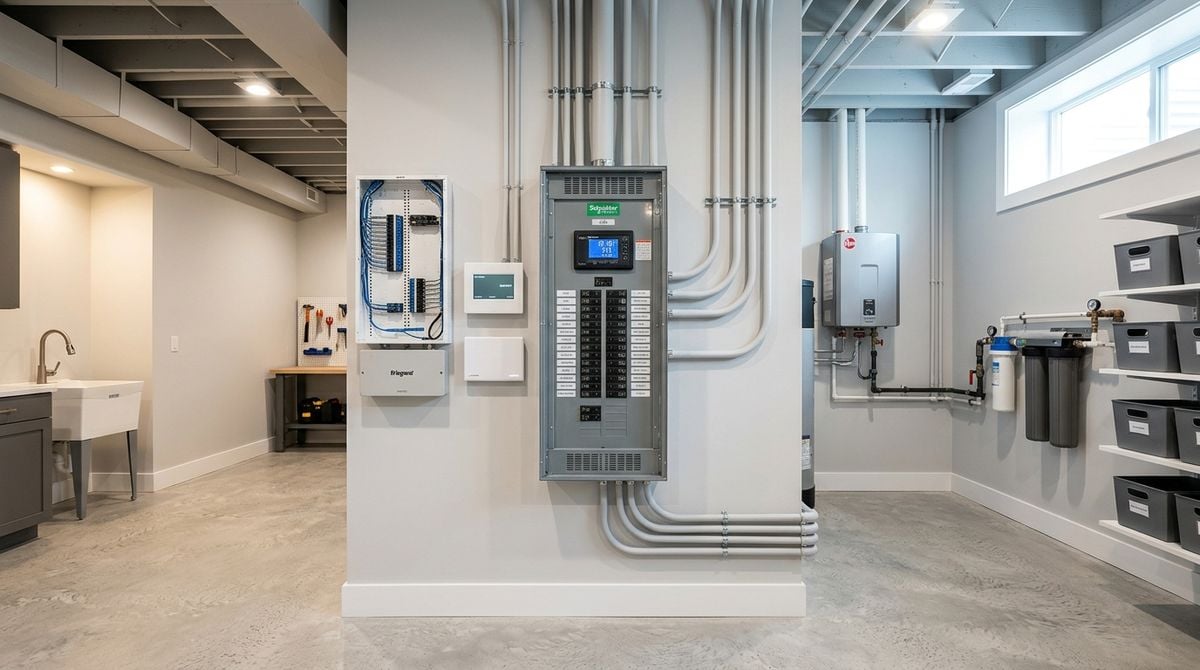
Modern gaming rigs, audio interfaces, outboard preamps, and active studio monitors place specific demands on residential electrical systems. During home inspections, examine the main circuit breaker panel to see how branch circuits are distributed. Ideally, your media studio should run on its own dedicated circuit rather than sharing a breaker with major appliances like refrigerators or microwave ovens.
Appliances with cycling compressors and heavy motors introduce electrical noise that travels through shared wiring. This interference often manifests as background hum in studio monitors, jitter in sensitive digital converters, or ground loops between your computer tower and audio gear. A dedicated circuit provides clean power and helps prevent nuisance trips when your computer and multiple amplifiers draw power simultaneously.
Inspect the physical outlets throughout your candidate room. Older homes sometimes feature ungrounded outlets that have been updated with modern faceplates without an actual ground path behind the wall. Proper earth grounding is essential for shielding high-gain instrument inputs, preventing static discharge, and safeguarding sensitive microelectronics during routine use.
Managing Airflow, HVAC Noise, and Dust Exposure
High-performance desktop computers and powerful audio amplifiers generate substantial heat during long gaming sessions and rendering tasks. A small room with inadequate ventilation will rapidly turn uncomfortable, forcing cooling fans on your graphics card and power supply to run at maximum speed. That acoustic fan noise raises the noise floor of your room, making critical audio mixing and clear voice communications far more difficult.
Observe the heating and cooling vents in every prospective room. Large, unbaffled sheet-metal ducts can act as acoustic pipes, carrying conversations from the living room straight into your workspace. In addition, forced-air systems circulate pet dander and airborne fibers that settle inside computer heatsinks, between vinyl record grooves, and across mixing console faders.
Maintaining a clean environment protects mechanical faders, turntable styluses, and cooling fans from premature wear. Consulting clean-home resources and practical reviews on Bestvacuumcleaners.org allows you to select a sealed-filtration cleaning machine capable of removing microscopic debris from carpets and floorboards without exhausting fine dust particles back into the path of your gear fans. Establishing a clean perimeter keeps thermal performance steady and audio hardware quiet.
Essential Checks for Your Next Property Walkthrough
Before making an offer on a prospective property, take an active walkthrough focused strictly on the room intended for your media and audio setup. Bringing along a few simple tools and following an intentional routine will reveal potential flaws that traditional home staging hides.
- Test wall outlets with an inexpensive circuit tester to confirm proper electrical grounding.
- Clap your hands sharply in the center of the room to listen for harsh flutter echoes and ringing.
- Measure hallways, tight stairwells, and door frames to ensure wide studio desks and heavy speaker cabinets can pass safely.
- Open and close all windows to inspect the condition of weather stripping and exterior sound dampening.
Settling In and Building Your Acoustic Foundation
Once you complete your move, resist the urge to unbox every console and audio instrument immediately. Moving into empty rooms provides a rare chance to hear how the bare space responds to normal speech and foot traffic. Placing a large rug, positioning bookshelves along reflective surfaces, and arranging your desk away from front corners will create a balanced baseline sound before you plug in an amplifier.
Taking the time to match your residential layout with your audio and gaming needs ensures your new home supports your passions effortlessly. By prioritizing room geometry, clean electrical paths, and sensible airflow during your search, you create an environment where music sounds authentic, games feel immersive, and daily living remains peaceful for everyone under your roof.